Store management
Review orders, products, customers, returns and sales reporting.
Store operations, inventory and finances.
One workspace to keep the picture clear.
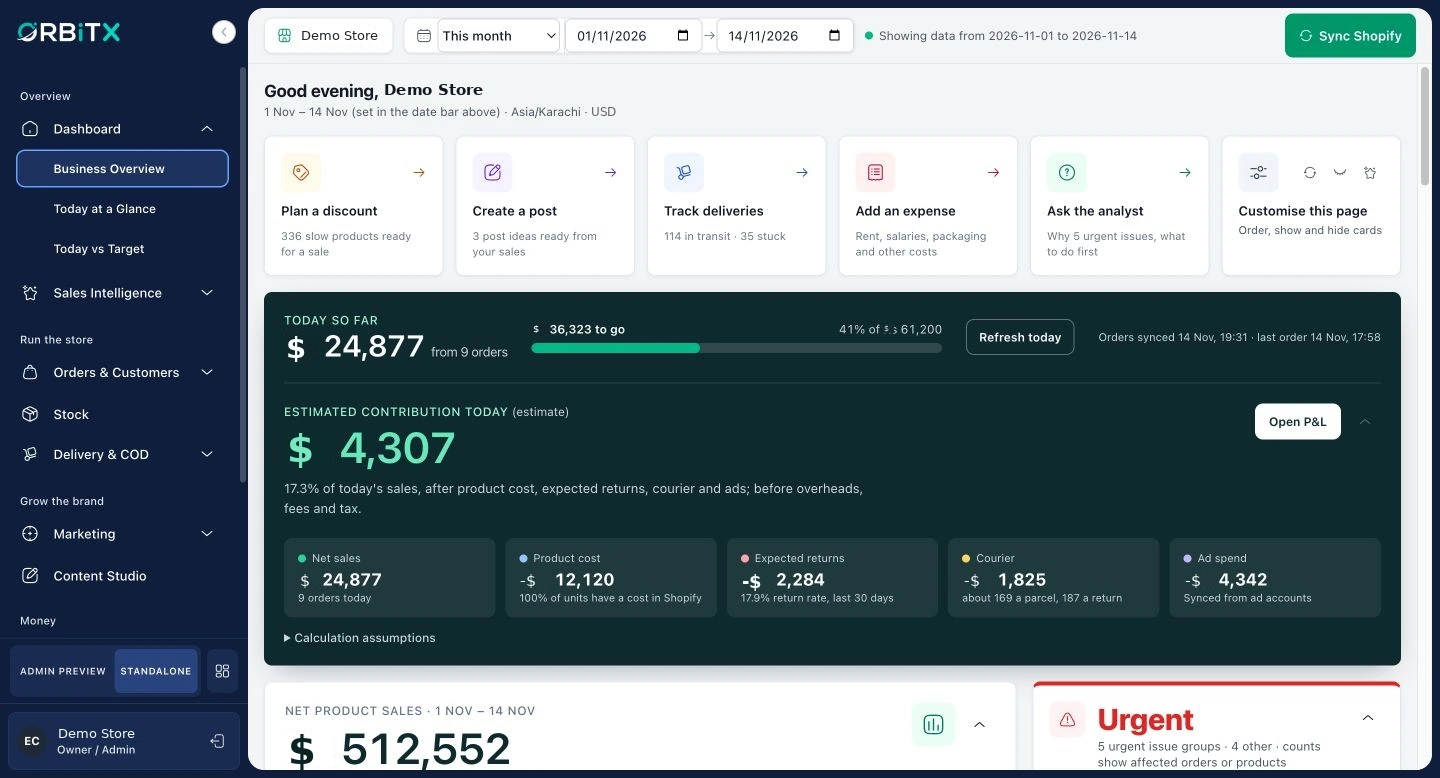
Original OrbitX interface · Demo Store · USD ($)
Keep store data and operational reporting in one place. Review performance, monitor stock and follow the financial detail behind daily decisions.
Review orders, products, customers, returns and sales reporting.
Track available stock and review inventory reporting for your store.
Work with ledgers, payables, receivables and financial reports.
Bring supported marketing and courier reporting alongside store data.
Review sales, product costs and configured expenses in the accounting dashboard. Explore the ledgers and reports behind your business.
Report completeness depends on imported history and connected data. Review source records before relying on totals.
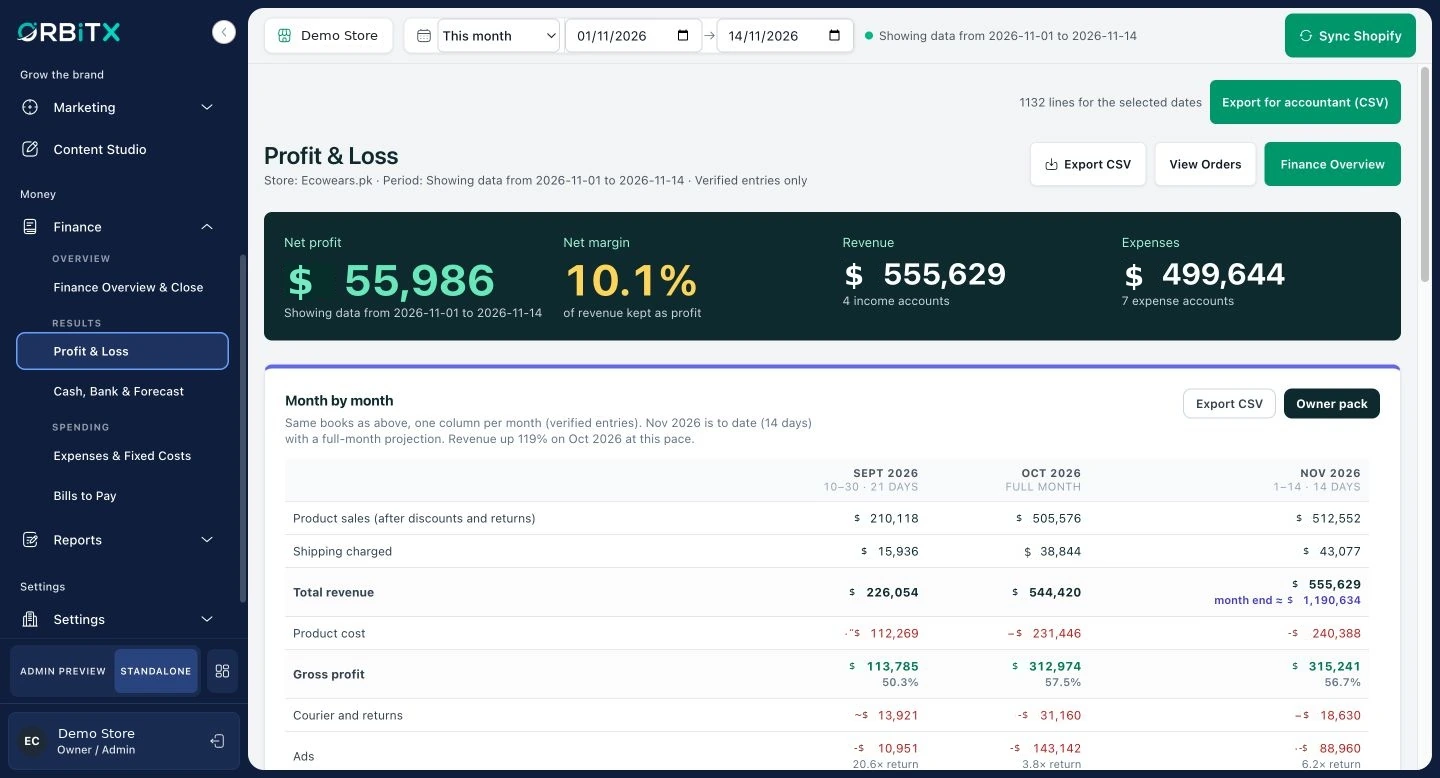
Original app interface, with Demo Store branding and USD currency labels. The numeric figures are retained for presentation; this is not an exchange-rate conversion.
Download the narrated video ↓Authorize the app through Shopify. Ask us about current access availability.
Complete initial synchronization and historical imports.
Set up your costs and supported integrations, then review your reports.
OrbitX’s public App Store release is being prepared. Contact us for availability, a walkthrough and pricing details.
Discuss OrbitX ↗Original OrbitX application screens, presented as Demo Store with USD ($) currency labels. Original numeric figures are retained for this presentation; they have not been exchange-rate converted. Personal customer records are excluded.
44 screens
Catalogue totals, unit count, stock valuation, selling-price valuation, sold-out listings, missing sizes, missing costs, product cards and filters.
Daily sales, order count, estimated contribution, product costs, expected returns, courier cost, ad spend, quick actions and customizable dashboard.
Seven-day comparison, daily snapshot, net sales, orders, estimated profit, ad spend and explanation of the day’s movement.
Monthly sales goal, progress, required daily sales, month-end forecast, daily orders and advertising efficiency.
Prioritized opportunities: pricing fixes, bestseller replenishment, slow-stock clearance, advertising winners and upcoming events.
Top sellers and product images, sales, margin, units, stock, growth and decline groups, slow movers and search filters.
Pakistan retail-event calendar, Black Friday preparation, Cyber Monday, seasonal windows and campaign planning links.
Products to advertise, customer win-back and prepaid-order opportunities; product-level contribution and ad-spend headroom.
Restock priorities, overstock, cash tied up in inventory, days of cover, missing sizes and stock-data warnings.
Profit waterfall from net product sales through product cost, delivery, advertising and overhead; cost assumptions warning.
Per-product realized selling price, cost, contribution, units, stock, suggested price, projected margin and recommended action.
Below-policy prices, below-cost items, loss-making products and required minimum prices in an actionable list.
Gross/contribution margin targets, packaging, fulfillment, COD/payment fees, overhead, discount caps and ad-allocation assumptions.
Cash tied up in clearance candidates, current price and cost, conservative/balanced/clearance scenarios and profit projections.
Campaign budget summary, lifecycle stages, templates, event suggestions and clearance/winner proposals.
Question interface and profit, stock, discounts and campaign prompts.
Connected sources, available order history, cost coverage, rules version, missing visitor tracking, stock receipts and customer-history limitations.
Inventory at cost and selling price, excess cover, slow-moving stock, missing costs, negative stock and category composition.
Book profit, finance alerts, return and product watches, break-even, cost history and finance navigation.
Revenue, expenses, net profit and margin, monthly comparison, product cost and other financial line items.
Book cash, period change, opening balance, bank matching and 13-week cash projection with receipts and fixed commitments.
Recurring rent, salaries, utilities and software costs, monthly totals and payment-recording controls; no payment was recorded.
Unpaid, overdue, upcoming and paid bill totals; supplier-bill form and payment workflow.
Delivered and returned percentages, COD cash outstanding, dispatch speed, fulfillment stages and delivery aging.
Parcel totals, delivery status, COD due/received, courier charges, return charges and settlement comparison.
Settlement-order totals and delivery status filters.
Parcel count, total value and delivery-status filters.
Ad spend, store-sales return, attributed sales, profit after ads, channel distribution, impressions, clicks and reach.
Spend, revenue, return and profit after ads; funnel progression, strongest campaigns, weak returns and campaign filters.
Today’s posting schedule, pending approvals, design/caption work, scheduled/published totals, revenue, ROAS and upcoming retail events.
Post details, campaign/category/product selection, audience, objective, hook, caption, hashtags, CTA, preview and AI connection controls.
Month calendar with retail events and daily scheduling controls.
Due/upcoming posts, evergreen queue, available slots, publish controls, auto-publisher and queue settings.
Owner summary of sales, profit, cash, ad spend, receivables, payables, stock, break-even and monthly outlook.
Executive summary, daily snapshot, order, sales, marketing and accounting export entry points.
Initial bank/cash, inventory, receivables and ownership balances; start-date setup.
Shopify sign-in and permissions model for owners/admins and staff, with link to manage app access in Shopify.
Current plan indicates all features included and billing disabled for this store.
Order count, net value, COD share, estimated order profit and new/packed/in-transit/delivered/returned/cancelled stages.
Returns/cancellations, reversed sales, return courier charges, unpaid refunds, workflow stages and reasons sales came back.
Customer count, repeat rate, customer sales, average value and segment actions.
Connection health, latest order/stock sync timestamps, 7/30-day order coverage and historical stock-save timeout failures.
Gross sales, discounts, returns, net sales, shipping, taxes and fees, daily trends and accounting-entry controls.
Stock-aware product selection, platform/content mix and draft automation rules for launches, restocks, low stock and slow movers.